
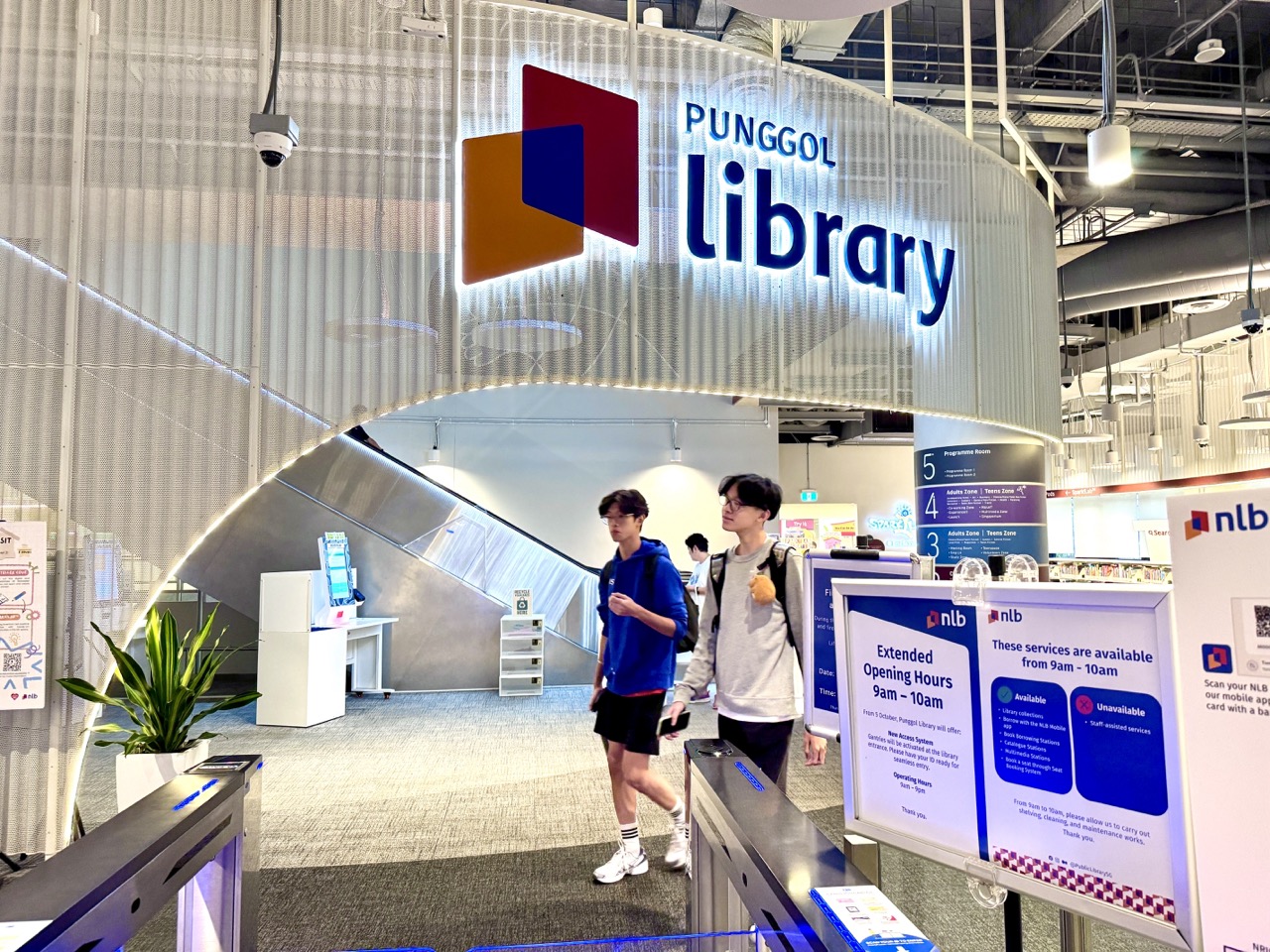
Quick answer: Punggol residents can learn how to design, prototype and test useful objects at MakeIT, Level 4 of Punggol Regional Library in One Punggol. The National Library Board (NLB) offers introductory making workshops and access to technologies such as 3D printing, digital cutting and other fabrication tools. However, equipment access is controlled: some machines require Starter certification, booking, age suitability and compliance with NLB safety rules. Having a good idea does not automatically grant permission to operate a 3D printer.
NLB’s current MakeIT programme page describes workshops and materials as available without charge for NLB members and recommends equipment and programmes generally for ages 15 and above. The standard published opening pattern is Wednesday to Sunday, noon to 8.30pm, with named closure days. Specific workshop requirements, dates and machine schedules take precedence. The equipment booking service uses Singpass verification and sets out the applicable certification requirement for machines.
The educational goal is larger than printing a decorative object. A student should learn to specify a problem, measure accurately, explore alternative solutions, predict what may go wrong, test safely and explain what changed after feedback. Those habits connect Mathematics, Science, Art, English and Computing. This guide is a project-based learning pathway, not a claim that children may enter a restricted workshop or that the library offers a formal engineering qualification.
What MakeIT offers—and what a family should not assume
- Introductory workshops explain making technologies in a beginner-friendly way; eligibility and places depend on the particular session.
- Some 3D printers, 3D pens and sewing machines can be booked using NLB’s stated self-service process, subject to availability and machine conditions.
- Relevant Starter Sessions or certification may be required before independent use of certain equipment.
- MakeIT recommends its machinery and programmes broadly for learners aged 15 and above; workshop-specific guidance can differ.
- Group learning journeys may be requested but are approved case by case, not automatically for every school.
- A prototype made at a public library is not automatically food-safe, load-rated, medical-grade or approved for commercial sale.
- Younger children can pursue paper-based design projects or appropriate NLB activities such as Spark!Lab without operating specialised machines.
The six decisions behind a genuinely useful prototype
Define the user. Who needs the object, what is difficult now, and what will count as improvement? A student who says ‘I want to print a box’ has identified a preferred method, not a problem. A better brief might be ‘Can a small organiser keep three pens from rolling off a study desk within a 15 cm footprint?’ The second description can be tested.
Measure the constraints. Length, width, height, material, handling and available space determine what can fit. Work in a consistent unit system. Sketching with centimetres while a digital tool expects millimetres creates a tenfold error. Dimensional accuracy is an ordinary secondary Mathematics competency with immediate practical consequences.
Generate alternatives. Before using a printer, draw three ideas: an open tray, divided pockets or a folded cardboard holder. Compare user access, assembly, material use, stability and the effort required. A design that uses less sophisticated technology may be the better solution.
Prototype cheaply. Paper, card and reversible craft materials make early iterations less expensive and wasteful. A 3D-printed object may be justified when its geometry or durability requires that method, but complex fabrication should not become the educational outcome by default.
Test under a safe and stated rule. A holder intended for three pens can be evaluated with those pens on a flat tabletop. Record whether it remains stable, whether each pen can be removed comfortably and whether it fits within the specified area. Do not test uncertified devices with heavy loads, hot surfaces, electrical wiring or bodily support.
Explain what failed. An object that almost works can be more educational than an apparently perfect object with no project record. Keep the original measurements, describe a problem and make one justified change at a time. A clear failure analysis is meaningful evidence of reasoning.
Worked example: why an outer volume is not a material estimate
Consider a fictional rectangular open-top tray with outside dimensions 12 cm by 8 cm by 3 cm. Its outer bounding volume is 12 × 8 × 3 = 288 cm³. This does not mean the tray needs 288 cm³ of printing material: the inside is open, and a real printer may use walls, infill, supports and various manufacturing settings.
Suppose an idealised solid-wall classroom model uses uniform 0.4 cm walls and a 0.4 cm base. The inner length is 12 − 0.8 = 11.2 cm, the inner width is 8 − 0.8 = 7.2 cm and the inner depth is 3 − 0.4 = 2.6 cm. Therefore, the interior open volume is 11.2 × 7.2 × 2.6 = 209.664 cm³. Subtracting gives an idealised wall-and-base material volume of 78.336 cm³.
The result is a geometry lesson, not a real printer quotation. Fillets, infill, manufacturing layers and actual machine settings can change material use and cost. A student should say what was modelled and what remains uncertain rather than claiming the mathematical estimate matches a finished object.
A second worked example: paper packaging and surface area
An imaginary package is a rectangular box 8 cm long, 5 cm wide and 3 cm high. Its ideal surface area is 2(8×5 + 8×3 + 5×3) = 158 cm². A real paper net needs tabs, overlaps or allowances that the bare formula omits. Students can draw a net, fold a prototype and compare its actual construction with the first estimate.
If the folds do not line up, ask whether the measurements, cut lines or assembly method caused the problem. The aim is to turn a familiar geometry formula into a tested physical model, not merely to decorate a worksheet with a three-dimensional picture.
Eight school projects that teach making without demanding machine access
Project 1 — the low-risk book stand
Ask a pupil to design a stand for a lightweight worksheet, using folded cardboard instead of specialised equipment. The learner chooses a viewing angle, calculates a few lengths and tests whether the sheet stays in place on a flat surface. A model that tips over provides useful evidence about base width and balance. Keep the experiments low-risk and avoid claiming the design supports heavy objects.
For an upper-primary extension, compare two paper triangles supporting the same top panel. Students should identify what was controlled, what changed and how many tests they conducted. The claim should be limited to their own cardboard model.
Project 2 — a personalised but non-sensitive reading label
Design a high-contrast label for a fictional book organiser. The team compares two paper designs and asks consenting classmates which is easier to read. They can examine letter size, spacing, ambiguous symbols and colour contrast. Avoid collecting personal health information or assuming a design works for everyone with a visual impairment.
A later authorised maker session might fabricate a durable label, but the educational achievement begins with a good user question and a tested visual draft. Students should not describe an experimental label as a certified accessible product.
Project 3 — a geometry-based phone-holder mock-up
Using thick card, students create a model of a stand for a cardboard phone silhouette rather than putting an expensive real device at risk. They measure the intended angle and base length, then repeat a safe stability check. The work joins geometry, friction and design reasoning. Its purpose is a desktop demonstration, not a rated commercial accessory.
Record at least two versions and one difference between them. If changing the support angle also changes how easily the silhouette slides, students should explain that the variables may interact. An outcome becomes more useful when the limitation is named.
Project 4 — packaging nets with minimal waste
Give a group an imaginary sheet of card and two possible box nets. They calculate approximate area and compare how well the shapes fit on the sheet. Ask what has been left out: cutting blade width, tabs, misaligned folds and rejected pieces can all affect real material use.
Digital cutting is a potential future extension for an eligible maker, but paper and a ruler are enough to teach how geometry leads to a production choice. A student may discover that the mathematically smallest area layout is awkward to assemble.
Project 5 — a fictional school-supply sorter
Design a low-cost desk tray with three named compartments. Students decide whether the items need equal space and how a user removes each one. Build a paper model and test it with safe lightweight objects. A simple spreadsheet can store the estimated dimensions and the observed result.
One learner might make three equal compartments; another might notice that markers and erasers occupy different widths. This creates a genuine design question about allocating limited space based on measured need rather than visual symmetry alone.
Project 6 — a paper bridge that reveals assumptions
Under suitable school supervision, compare paper strips supported at different span lengths. Use small agreed weights or toy objects in a controlled setting. Students record when bending becomes visible and avoid exaggerating the model’s structural reliability. The bridge is not a real safety-rated object.
The lesson is to notice how geometry, supports and material choice interact. A good report will describe the test conditions and why the result cannot be scaled directly to a real footbridge.
Project 7 — a mock sewing pattern
Before using any machine, a learner can draw a rectangular fabric pattern with seam allowances. If a proposed finished width is 20 cm and the example uses an allowance of 1 cm at each side, the cut width is 22 cm. This illustrates the difference between an intended final dimension and the starting material. It does not prescribe NLB’s workshop settings.
NLB lists sewing machines within MakeIT self-service options, but operating them requires the appropriate access conditions. A student can complete the Mathematics and draft a pattern before determining whether a real sewing course is suitable.
Project 8 — a redesign that deliberately includes a failure
Ask the learner to choose one earlier cardboard project and perform a new test that might reveal a weakness. For example, an organiser may fit three pencils but not a broader marker. Measure the error, modify the design and repeat the same test. The final portfolio should show both versions and the reasoning behind the revision.
Students should not be graded solely on whether the final object looks elegant. A candid analysis of a failed hypothesis builds scientific judgement, confidence and the willingness to improve a product rather than defend the first version.
What tolerance means to a secondary-school designer
A 20 mm part and a 20 mm slot may appear to fit perfectly in a digital model, yet real objects can differ because of manufacturing variation and material behaviour. An educational comparison might present slots of 20.0 mm, 20.3 mm and 20.6 mm and ask which extra facts are needed before choosing one. The values are illustrative, not recommended tolerances for any specific NLB equipment.
Learners should distinguish a nominal dimension from an actual measured dimension. This is an excellent reason to teach approximation, measurement error and unit conversions carefully. Even the conversion 2 cm = 20 mm can become important when moving a sketch into modelling software.
Do more printer layers automatically mean more learning?
Consider a hypothetical 30 mm tall object printed in layers of 0.2 mm. The simple arithmetic gives 150 layers. But print duration also depends on paths, travel speeds, shape, infill and machine controls. Students cannot infer a reliable job duration or fee from layer count alone.
The wider educational point is that one measured variable rarely explains an entire process. A good maker asks which additional data are needed, checks the tool’s validated estimate and respects the operator’s booking conditions. Guessing confidently does not make an estimate accurate.
Spark!Lab and MakeIT are different educational entry points
Punggol Regional Library also offers Spark!Lab on Level 2, aimed at children aged 7–12. This hands-on programme encourages curiosity and invention through age-appropriate activities. NLB’s published event details say children aged eight and below should be accompanied by an adult, and entry can be first-come-first-served or time-managed when necessary. Check the particular current event listing before travelling.
MakeIT, by comparison, has machinery, specific safety requirements and a general recommendation for older participants. Parents should not interpret permission for a younger child to attend Spark!Lab as permission to use Level 4 printers or cutters. The two spaces can form a healthy progression: playful investigation first, accurate measurement and school project work next, then eligible training on more demanding equipment.
A family can also continue the learning at home with paper prototypes, small counting tasks or geometry sketches. No child should be made to feel that their Science interest is less legitimate because they cannot yet book a fabrication machine.
How Starter Sessions and bookings affect the learning plan
NLB’s MakeIT overview describes beginner-friendly Starter Sessions, while the separate booking page lists Punggol 3D printers, 3D pens and sewing machines. Bookings use the stated verification process. Some machines require a corresponding Starter certification; learning about one process does not automatically authorise using all equipment.
Before requesting a slot, learners should have a design brief, approximate dimensions, a reason for choosing the machine and a realistic fallback if the object cannot be produced. A visitor who arrives with only a file downloaded from the internet may not understand its material or safety limits. Staff guidance and centre rules take priority over the student’s initial plan.
NLB also welcomes group learning-journey enquiries, but approvals are case-by-case and subject to availability and other circumstances. Teachers should explain this distinction when announcing school activities. A class should not be told that a private training session is confirmed until NLB has actually approved the request.
An access checklist for Punggol families
- Confirm which programme or equipment you actually intend to use.
- Check whether the relevant activity meets the learner’s age and safety requirements.
- Review the current operating days, closure notices and event schedule.
- Complete any required Starter training before making a machine reservation.
- Check the correct booking channel and whether Singpass verification is required.
- Ask which materials, file formats and procedures the chosen activity permits.
- For groups, submit the learning-journey request through NLB’s official route and obtain confirmation.
- For accessibility needs, enquire about suitable arrangements rather than assuming all tools fit every user.
- Keep an alternative school-safe project available if a slot is full or equipment unavailable.
Why a machine-made product needs a safety disclaimer
A 3D printer can reproduce geometry, but the resulting object’s behaviour depends on material properties, orientation, process settings, environment and intended use. A classroom object should not be assumed appropriate for food contact, children under a particular age, heavy loads, electrical insulation, high temperatures or personal mobility. These uses may require professional design and formal safety assessment.
For a maker interested in assistive technology, user participation and rigorous validation are especially important. An object that looks helpful can create discomfort or risk if it fits poorly or fails unexpectedly. Students may create mock-ups and study accessibility but should never claim a homemade aid is medically effective or safety-certified.
The safest educational projects are those where failure has small consequences: an organiser for paper cards, a printed label used in a non-critical context or a low-load desktop demonstration. Choosing a low-risk project is an engineering decision, not evidence of low ambition.
Sustainability: why ‘we printed it’ is not an environmental argument
Fabrication uses materials, energy and machine time. A printer may produce supports or failed attempts that create waste. Students should ask whether a repair, reusable paper mock-up or existing object serves the purpose before fabricating something new. An attractive item that is never used has consumed resources without providing much benefit.
A student can construct a simple options table: Method A uses cardboard, Method B uses a 3D print and Method C adapts an existing object. Compare expected function, number of trials, longevity, ease of revision and material use. The best option depends on the actual task, not which process looks most technologically advanced.
Even a supposedly durable product may have poor sustainability if it is difficult to repair or if several unsuccessful iterations are discarded. A model using more material might last longer; a thinner model might fail. The environmental conclusion requires more information than the object’s nominal weight.
Inclusive making: a user is a participant, not a prop
Punggol has hosted NLB events exploring inclusive technology and low-cost assistive design with community partners. A past event demonstrates that this type of co-creation is possible, not that a perpetual weekly programme is currently open. Families should seek a new dated event notice before promising participation.
When a project is intended for someone with a disability, students must avoid inventing that person’s needs. Ask consenting users or qualified facilitators what problem matters to them, and use appropriate methods that protect dignity and privacy. In a school project without such access, label the design hypothetical and avoid claims of genuine user validation.
Accessibility can also be addressed without making devices that support a person’s body. Clearer labels, readable instructions, tactile educational cards or alternative response formats can be explored at low risk. These still require thoughtful design and user choice.
A fair comparison between two prototypes
Suppose Version A of a fictional tray holds five lightweight cards and Version B holds six. Is B the better design? Not automatically. B may occupy twice the desk area, be less stable or be harder for the user to access. Choose a primary objective such as card capacity, plus constraints on width, stability and usability. Then compare both prototypes under the same safe conditions.
Use a table with measurements, units and test results. Name any difference in materials or method; do not quietly change a variable and present the result as a controlled experiment. This is the same discipline students need in scientific inquiry and mathematics investigations.
A maker portfolio should record work, not marketing
A worthwhile project portfolio contains the original question, sketches, dimensions, sources, test methods, results, failures and a reasoned conclusion. Downloaded plans must be credited. If AI tools or templates assisted, the learner should explain what was generated and which decisions they independently made, following school or programme policies.
Students should be able to reproduce their calculations and explain the limits of their measurements. A file full of printed-object photos without a brief or tests is weaker educational evidence than one modest object supported by a transparent development log.
Twelve weeks from school Mathematics to a tested design
Weeks 1–2: observe a problem and agree on its scope
Choose a low-risk problem at home or school. Ask who is affected, what currently happens and what a better result would look like. A school pencil organiser or a clearer information card is enough. Record a maximum size, intended material constraints and one measurable criterion before drawing the final object.
Weeks 3–4: use geometry to eliminate weak ideas
Sketch several shapes and use simple measurements, nets or scale drawings to decide which are physically plausible. Calculate length, area or volume only where relevant. Check units independently and mark idealised assumptions. The goal is to use Maths to improve the design, not to force a calculation into every paragraph.
Weeks 5–6: create the simplest safe prototype
Build a paper or cardboard version and test it with low-risk materials. Record whether a chosen item fits and whether the model remains stable in the stated setting. Ask one consenting user for feedback. If a suggestion cannot be tested yet, label it as a proposed change.
Weeks 7–8: revise and compare fairly
Change one feature that the test identified as important. Repeat the original test without quietly changing the success rule. Record both versions and explain whether the revision improved the chosen outcome while preserving any necessary constraints.
Weeks 9–10: consider digital fabrication only if it solves a problem
Where age, access and project suitability permit, examine an NLB Starter Session and the proper machine booking route. If the learner is too young, a slot is unavailable or the project is unsuitable, continue with approved school-level modelling. An educational outcome should not depend on the mere presence of a specialised machine.
Weeks 11–12: write the evidence and decide what follows
Complete a concise project report. Include a labelled sketch, dimensions, test observations, limitations and one future revision. State whether the object is a classroom mock-up or an authorised fabricated piece. Avoid claims of commercial fitness, certification or universal accessibility.
Progression from Primary school to university and adulthood
For a younger Primary pupil, identifying shapes, measuring paper strips and explaining the purpose of a model may be the right learning level. An upper-primary learner can build nets, calculate simple surface areas and compare designs. A lower-secondary learner can refine tolerances and interpret results, while an older Secondary learner may develop a small computer-aided model under appropriate school guidance.
ITE and polytechnic routes can provide more formal technical competencies in design, manufacturing, engineering or creative applications. University students may meet specialised labs, project work, safety and industry standards. An adult hobbyist may have a different purpose again: personal creativity, repair, accessible design or skills exploration. The existence of MakeIT does not replace those qualifications; it can encourage inquiry and beginner practice.
Parents should avoid demanding an advanced project at every age. A good learning sequence lets measurements, explanation, safe testing and confidence deepen before complexity rises.
Practical questions before joining a maker activity
- What problem or learning objective does the participant want to explore?
- Does the specific workshop or equipment meet the participant’s age and access requirements?
- Is a Starter Session required for the chosen category of machine?
- Has the current booking and operating schedule been checked?
- Will the design use NLB-permitted materials and follow staff instructions?
- Can the project be prototyped safely without a machine first?
- What counts as a successful test, and what limitations must be reported?
- Are copyright, attribution and original student contributions clear?
- For school groups, has NLB explicitly approved the learning-journey request?
- Does the plan include a meaningful fallback if equipment or space is unavailable?
Frequently asked questions about MakeIT learning in Punggol
Where is MakeIT at Punggol Regional Library?
NLB identifies the space on Level 4 of Punggol Regional Library in One Punggol. Follow current entrance, lift and wayfinding notices, especially where accessibility assistance is needed.
Are MakeIT workshops and equipment free?
NLB describes its workshops and materials as free for members and offers suitable equipment access under its terms. This does not waive certification, age guidance, time-slot requirements or safety rules.
Can a child aged seven use the Level 4 machines?
MakeIT equipment and programmes are generally recommended for ages 15 and above. NLB’s Spark!Lab on Level 2 is a separate hands-on opportunity for children aged 7–12, subject to its own arrangements.
What are the published MakeIT opening hours?
The NLB overview lists Wednesday to Sunday, 12 noon to 8.30pm, with closures on Mondays, Tuesdays, public holidays and particular holiday eves. Check current service notices for any change.
Does a machine booking replace the Starter certification?
No. NLB specifies that relevant machines may require proper Starter certification before use, even where booking is available.
Must children learn programming before a maker project?
No. Measuring, drawing, constructing a paper net, comparing models and explaining failures are worthwhile foundations. Code becomes useful only where it serves a defined task.
Can a 3D-printed object be used for food or to support a person’s weight?
Do not assume so. Safety-sensitive uses require correct materials, design assessment and standards beyond an ordinary library model. Keep school projects low-risk.
Can a school arrange a MakeIT learning journey?
NLB offers a group enquiry route and reviews requests individually. A proposed visit is not confirmed until the organisers approve the arrangements.
How should an AI-generated design be credited?
Record the role of generative tools, source files and original student decisions in accordance with programme or school rules. Do not present generated features as independently mastered skills.
Does a maker certificate secure an engineering course or career?
No. Formal admissions and employment criteria are separate. A clearly documented maker project may demonstrate interest and reasoning, but it is not an automatic academic qualification.
What is the best first project?
Choose a low-risk paper model with an unambiguous purpose and one safe, measurable outcome. The educational benefit comes from revision and explanation, not a machine’s complexity.
What should parents do when the requested machine slot is full?
Continue the planned research, drawing or test in an appropriate setting, then check official availability later. A missed slot does not invalidate the learning.
What Punggol’s makerspace makes possible
The durable opportunity at MakeIT is a way for residents to encounter the relationship between design intention and physical evidence. The space may provide tools, workshops and a community of making, but progress comes from the learner’s decisions: measuring, checking, revising and taking responsibility for a product’s limits.
For a schoolchild, a carefully tested folded-card model can be a meaningful first step. For an older learner, authorised fabrication can deepen that process. For an adult, a simple personal project can open an interest in engineering or design. The right achievement is a better thinker—not merely an object made by a machine.
Official sources and related Punggol reading
- National Library Board — MakeIT at Libraries programme, age guidance, hours and learning journeys
- NLB — MakeIT Yourself equipment booking and certification guidance
- NLB — Spark!Lab at Punggol Regional Library for ages 7–12
- eduKatePunggol — MakeIT location, workshops and equipment enquiries
- eduKatePunggol — converting prototypes into responsible entrepreneurship questions
- eduKatePunggol — SIT Community Challenge and design thinking


