
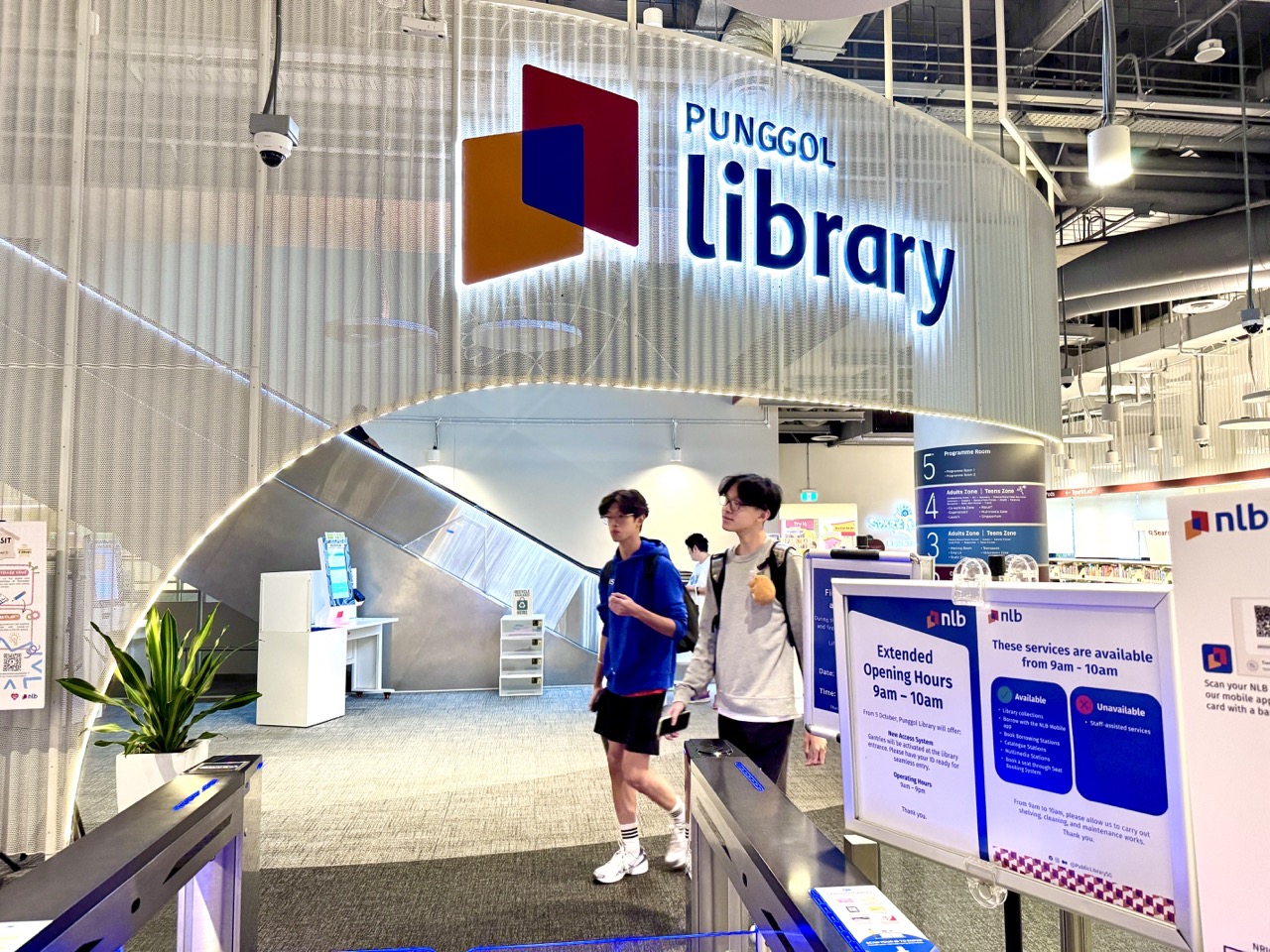
A family chooses a book at Punggol Regional Library, takes it to a borrowing station, and nothing happens. The screen might fail to recognise the library card, refuse to register a book, or show an error after several attempts. The correct next step is not to leave with the item and assume the loan was successful. Check the displayed message and the library account’s recorded loans, then seek NLB assistance or use an authorised alternative borrowing method if one is available.
The National Library Board (NLB) supports both physical borrowing stations and, for eligible items, borrowing through the NLB Mobile app. Punggol Regional Library also has an accessible Borrow-n-Go arrangement. These systems simplify a transaction, but a failed scan, an unavailable item, a membership restriction and a technical fault are different cases. A book’s presence on an open shelf does not prove it has been successfully lent to your account.
This Punggol guide explains how to troubleshoot safely, what information librarians need, why a scanned barcode is not the same as a confirmed loan, and how parents can protect a child’s account from an accidental unrecorded borrowing. It is written for everyday readers and does not claim any NLB machine in Punggol is currently faulty. It is also distinct from problems with returning overdue books or collecting reservations.
The answer in one minute
- Read the actual kiosk error instead of repeatedly pressing random buttons.
- Confirm that the correct NLB member account is being used and that the item is suitable for borrowing.
- Try a different authorised borrowing station only when library signs or staff allow it.
- For supported physical books, NLB Mobile may provide a scan-and-borrow route, but you must see an actual successful loan confirmation.
- Check your NLB Mobile account or official online loan record before leaving with the item.
- If the book does not show as borrowed or a kiosk repeatedly fails, ask library staff or NLB’s official support service for help.
- Do not attempt to remove an RFID tag, borrow under someone else’s account without authorisation or treat a kiosk error as permission to take the book.
1. What is a library borrowing station?
A borrowing station is self-service equipment that records library loans against a member account. Depending on the library and system, a patron may use a library card or supported digital identifier to begin, then place or scan a book so the library can register the item. The transaction should produce a confirmation and a due date.
NLB’s libraries have used automated borrowing and returning technology for decades. Its BiblioAsia article on the libraries of tomorrow explains how Punggol Regional Library incorporates accessible technology, including Borrow-n-Go, which supports easier borrowing for people with disabilities.
A modern borrowing station does not simply open a door when a book is placed near it. It needs an appropriate membership and an eligible item, and it must complete a library transaction. That is why a machine may reject a book even when the screen and reader seem to be functioning.
2. A successful scan and a successful loan are different
A scanner reading a barcode or RFID tag is one stage of a borrowing transaction. The library system must still verify the account and item status and record the loan. If an error occurs after the scan, the item may not have been charged out to the member even though its cover appeared on the screen.
Treat the confirmation as the decisive step. NLB Mobile can show physical loans and due dates under the member account. The official NLB Mobile guide describes the app as a way to manage borrowing and reading. Verify the title and item details whenever the status is uncertain.
Do not assume that a sound or green flash from a machine means the transaction has completed. Different models use different signals, and app interfaces can change. The correct evidence is the successful loan record or confirmation from authorised staff.
3. Four reasons a transaction might not go through
The station cannot read the member identifier
A physical library card could be positioned incorrectly or damaged, while a digital library code might not be recognised by a particular terminal or in an expired app session. Check the legitimate on-screen instructions and ask staff to confirm the accepted methods. Do not hold unrelated bank cards or confidential identity documents against the equipment repeatedly.
The station cannot read the book
A damaged tag, an unusual item type or a technical reading problem may prevent the book from being recognised. A staff member can check the item record and whether another approved borrowing method is available. Do not peel labels, bend the cover, force books through a slot or attempt to access hidden electronics.
The member account has a limitation
A member may have reached the applicable loan quota, have outstanding charges that suspend borrowing privileges, or face a membership or account issue. NLB’s payment and borrowing-privileges information states that borrowing privileges can be suspended when charges are outstanding. The correct response is to resolve the actual account condition, not to keep trying other machines.
The item is not eligible for ordinary loan
Reference materials, items awaiting processing, special collections or reserved items may follow different availability rules. A catalogue can show a title at a location without establishing that an individual copy is loanable at that moment. Ask a librarian about the precise item rather than assuming a machine is defective.
4. How NLB Mobile fits into the process
NLB’s mobile services can support borrowing eligible physical items by scanning the library’s authorised barcode or QR workflow. The interface provides a record of loans, due dates and other account functions. This can be a useful alternative when a kiosk is unavailable, provided the particular item and library service permit it.
The NLB Mobile experience should be followed exactly as the current app describes. A photograph of a barcode or an unfinished borrow screen is not a loan. A successful borrowing step normally displays the item and relevant due-date information, which should be checked in the account.
If the mobile borrowing function fails too, the correct explanation may be an account or item restriction rather than two independent equipment failures. Seek staff or NLB assistance instead of repeatedly switching networks or creating another account to bypass the restriction.
5. Punggol Regional Library has more than one borrowing experience
Punggol Regional Library is located within the One Punggol community hub and provides services for readers with different needs. NLB’s 2025 account of inclusive library design specifically describes a Borrow-n-Go portal on Level 1 with a screen positioned for easier access by wheelchair users.
That accessibility feature illustrates why the correct response to a malfunction should respect the needs of the user. A patron with limited mobility may rely on a particular station and should not simply be told to try a distant terminal without accessible directions or assistance.
If a feature appears unavailable, ask onsite staff about another supported borrowing method. Avoid claiming that all library stations are the same height or that every route inside the library is identical.
6. The Punggol Coast Comics & Games Library is different
NLB’s Grab-n-Go Libraries page describes the Comics & Games Library in Punggol Coast Mall as a self-service library with access and borrowing through supported NLB digital methods. It is not the same as the larger Punggol Regional Library, where staff services and broader facilities may be available.
A visitor who cannot borrow at a self-service location should follow the site’s official instructions and use the operator’s support route, rather than assume a librarian will be stationed beside every shelf. The correct service for borrowing, accessing a collection and using board games may differ.
If a QR code at the library entrance or a mobile borrowing function does not work, preserve the actual error message and ask NLB through its verified support channels. Do not share an account password or Singpass credential with a stranger offering to fix the kiosk.
7. What to do if the library card is not accepted
- Check that you are using a supported NLB library membership identifier for the chosen service.
- Read the screen instruction and ensure any required digital library code is current.
- Check whether the account works through an official NLB channel, without exposing passwords in public.
- Ask staff if the problem concerns a damaged card, temporary service issue or account status.
- Do not assume your membership has been terminated based on one failed reader.
- Follow the official recovery route if a card or digital account needs attention.
- Make sure the book is properly recorded as borrowed before leaving.
A child’s physical student identification card is not automatically an accepted NLB membership card at every device. If the household uses an NLB eCard or myLibrary account, check the current instructions and any eligibility conditions. The goal is to use a legitimate borrowing identity, not to experiment with arbitrary credentials.
8. What to do when the screen is frozen or blank
A blank screen may indicate power, connection, maintenance or equipment failure. A frozen interface may not be ready to record a transaction. Do not pull a plug, open an equipment panel, repeatedly press hidden controls or assume an older completed transaction is still active.
If another kiosk is available and the library permits use, you may try it with your own account and the same item. But do not move a damaged machine, move its cables or cover a sign indicating it is out of service.
If there is exposed wiring, broken glass or other apparent safety danger, keep clear and alert staff. A technical fault is an equipment-service issue; it is not a reason to access a machine’s internal parts.
9. What to record when asking for assistance
- The exact library and the level or location of the borrowing station.
- The approximate date and time of the failed transaction.
- The error text shown or whether the screen was blank or unresponsive.
- The title, author or item barcode copied from a safe visible label if needed.
- The type of membership identifier used, without posting secret account details.
- Whether the item ever appeared as successfully borrowed in the NLB account.
- Any existing case number from library staff or NLB support.
The book’s printed identifier may help staff distinguish copies of the same title. A catalogue listing for a popular book does not necessarily represent the exact physical copy in your hand. Keep the actual book available for authorised checking.
10. What if one book in a stack fails?
A parent may place several books at a station and receive a confirmation that only some were borrowed. The critical step is to compare the book count and titles with the completed transaction record. Do not leave with an unrecorded item simply because most of the stack was accepted.
If one item fails consistently, it may have an issue specific to its tag, status or loan permission. Staff can check it separately while the rest of the books remain correctly recorded. Avoid repeating the entire stack’s transaction in a way that confuses the account.
This situation teaches a useful principle: partial success is not complete success. A system recording four of five books should prompt an investigation of the fifth, not an assumption that every item has been checked out.
11. Why the checkout record matters for due dates
NLB members are responsible for items genuinely borrowed under their accounts. The due date affects when an item should be returned and whether a renewal is possible. If a book is never properly recorded as borrowed, the borrower may later have difficulty demonstrating when the loan started or which item was actually checked out.
NLB Mobile shows current loans and due dates. A family keeping several accounts should verify whose membership appears on the borrowing record, especially when children and adults use the same device. Avoid claiming that an item was borrowed by one person when the confirmation belongs to another.
If the loan record is inconsistent with what the screen appeared to say, ask a librarian for an official check. A handwritten family list is useful for organising books but does not replace the library’s authoritative record.
12. A child cannot complete the loan on a school-holiday visit
Consider a Primary 4 student visiting Punggol Regional Library with a parent. The child selects three books and places them at a borrowing station. Two titles appear with due dates, but the third produces an error. The parent checks the recorded loans and asks for assistance with the remaining book.
The family does not attempt to convince the child that the machine must have borrowed everything because the books were physically present. Instead, the parent uses the moment to explain that the library’s record must show the completed transaction.
That small lesson can prevent later disputes about an item that has been taken from a shelf without a properly registered loan.
13. A senior finds the borrowing screen difficult
A senior may have difficulty reading small text, operating a touchscreen or presenting a digital code. An accessible terminal can help, but accessibility also depends on clear instructions, a route to reach the machine and patient assistance when something goes wrong.
NLB’s article on Punggol’s inclusive library design explains that the regional library incorporates equipment to support patrons with different needs. A resident who needs assistance should ask about the suitable service rather than assume a technical mistake reflects a personal failure.
A companion can help read general screen instructions without taking unnecessary control of the patron’s account. Do not photograph passwords or encourage the person to hand over a phone to an unidentified helper.
14. What if the borrowing problem concerns an outstanding charge?
NLB’s official payment page explains that unpaid charges can suspend borrowing privileges and lists authorised ways to pay through online services or supported library stations. Before paying an unfamiliar amount, check what the charge relates to in the authenticated account.
A machine error is not always a payment request. Do not scan an unexpected QR code at a malfunctioning kiosk to pay a supposed ‘unlock fee’. Use the verified NLB Mobile app or website, and ask library staff if the amount or reason is unclear.
If a dispute concerns a book already returned or a lost item, use the appropriate NLB enquiry process rather than paying simply to make the screen move forward.
15. What if the item is reserved or non-circulating?
A library may hold different copies, collections and service rules. One copy of a book could be available for ordinary loan while another is reference material or reserved. A display saying ‘not available’ should be checked against the exact item and its status.
NLB’s OneSearch FAQ explains that catalogue information and library account or facilities questions can be directed through NLB’s feedback and Ask a Librarian services. Those services are more appropriate for checking lending status than assumptions based on a shelf location.
It is reasonable to ask for a different available copy or a reservation option where the service permits it. But a self-checkout failure does not create an automatic entitlement to borrow restricted materials.
16. What the family should do before leaving
- Count the books physically in the family’s possession.
- Read the completed loan confirmation, if available.
- Match the recorded books and due dates to the actual items.
- Resolve any missing or uncertain transaction through the permitted library or staff process.
- Keep personal membership and login information private.
- Arrange a reminder based on the official recorded due date.
- Leave with only items legitimately checked out to the appropriate account.
This checklist can feel slow during a crowded weekend. In practice, it prevents more complicated disputes later. The family can stand aside from the borrowing queue while reviewing the account so other patrons can use the machine.
17. A simple troubleshooting report for NLB
A clear enquiry might say: ‘At Punggol Regional Library on [date] at [time], the borrowing station near [level or location] read my library account but would not register the book [title or item ID]. The screen displayed [message]. I checked the NLB loan record and the title was not listed. Please advise the authorised next step.’
This gives staff the relevant technical and account context without exposing passwords, identity numbers or the family’s full borrowing history publicly. If support needs account-specific information, provide it through a secure official channel.
Use NLB OneSearch’s feedback and Ask a Librarian links or ask onsite staff for the current support contact. Avoid inventing a dedicated Punggol machine-repair number.
18. The difference between borrowing and returning
A borrowing station records items leaving the library under a member’s loan entitlement. A bookdrop or return station records items going back. The two systems can look similar to a casual visitor but serve opposite functions.
Do not put a book you want to borrow into a return slot, and do not treat a failure at a borrowing kiosk as proof the return service is also down. The correct troubleshooting depends on which direction the item should travel.
For an actual returned book that still appears on a member account, check the separate loan and returns guidance. The cause and evidence are not the same as a failed checkout.
19. What technology can and cannot promise
Digital systems reduce repetitive work and make services more accessible for many people. They still rely on readable tags, correct account data, suitable user interfaces and functioning communication with the loan system. A good user experience allows a person to recognise a failure and obtain help without needing technical expertise.
This is a useful distinction for students learning about technology. A scanner detecting an item is not identical to a database completing a transaction. If either part fails, the overall process is incomplete.
Responsible public services also provide an accessible alternative when possible. The goal is not to make the patron diagnose an RFID system; it is to make borrowing reliable and keep the library’s collections accountable.
20. Common mistakes
- Leaving with an item because the kiosk made a beep but gave no successful loan record.
- Assuming all NLB library items are borrowable regardless of collection rules.
- Peeling an RFID label or damaging a tag to make the book scan.
- Entering a password in an unofficial help page reached through a random QR code.
- Borrowing on another person’s personalised account without appropriate authorisation.
- Paying an unexpected charge before verifying it through official NLB systems.
- Treating an unrecorded item as borrowed simply because other books in the stack succeeded.
- Posting photographs of a member card or full library account online.
Frequently asked questions
Can I leave with a book after a checkout error?
Not until the borrowing has been properly completed or library staff have provided an authorised alternative. Check the recorded loans.
Can NLB Mobile borrow physical books?
NLB provides supported mobile borrowing features for eligible materials. Follow the current app instructions and confirm that the item appears as successfully borrowed.
What if the station refuses only one of several books?
Check the successfully recorded items and ask staff to inspect the specific book’s status or tag. Do not assume the whole stack was borrowed.
What if I cannot use the touchscreen easily?
Ask about accessible equipment or staff assistance. Punggol Regional Library has introduced inclusive borrowing technology, but users should follow the current facility arrangements.
Where can I send a library account or machine enquiry?
Use onsite NLB staff where available or NLB’s official feedback and Ask a Librarian services. Provide the library, device location, time and error message.
Official sources and local reading
- NLB — NLB Mobile and Borrowing Account Tools
- NLB BiblioAsia — Punggol Regional Library and Accessible Borrow-n-Go
- NLB — Punggol Coast Comics & Games Library and Grab-n-Go Services
- NLB — Charges, Payments and Borrowing Privileges
- NLB OneSearch — Feedback and Ask a Librarian
- eduKate Punggol — Local Library and Community Information
Reviewed 6 November 2026. This article is general borrowing advice, not an account-specific NLB ruling. Borrowing eligibility, library machine availability and app screens can change; use current NLB guidance and staff instructions for a particular transaction.


